Pixels of the Week – July 19, 2026
Mindful user centric design, summoning explosive Pomeranians & centering anything in CSS.
Pixels of the Week is my weekly-ish curated newsletter for designers, UX folks, devs, and anyone building accessible, inclusive, usable (and let’s be honest, awesome) digital products. This week I’m interested in mindful user centric design and how AI shapes discovery versus delivery. I also summoned explosive pomeranians, centered things in CSS and created fun lo-fi effects on images.
Subscribe to my newsletter to get this directly in your mailbox!
Gaming and holidays!
New season on WildRift (League of Legends) started and I’m grinding my way to the top with Soraka, my queen, my goddess. If you play on the European server let me know, happy to add some nice people to my gaming friends!
Also, I’m taking some days off, from next week to mid August. This is the last newsletter for the next 3 weeks.
A free accessibility webinar in September
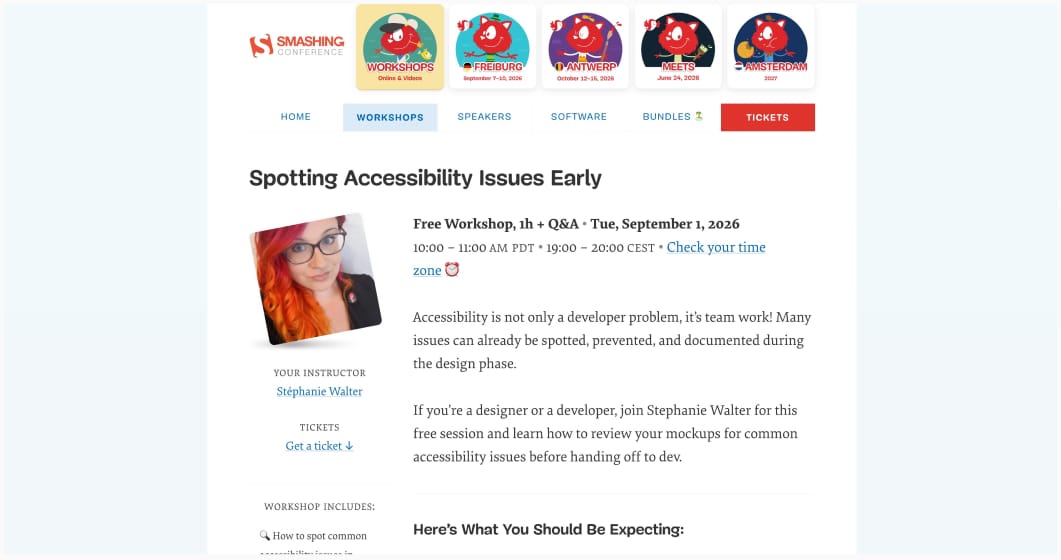
When I’m back in September, I’m running a free webinar: 1 hours, online, to help you spot accessibility issues early. It’s on September 1, 2026 10:00 – 11:00 AM PDT • 19:00 – 20:00 CEST.
Most popular content this week
The Mindful Design Toolkit Scott Riley created a toolkit to help you design better, more mindful products. I like how he brings back the main principles and methods of user centric design, with some files that you can use to kick start your own projects. In the age of AI centric design, we need that!
Articles
Discovery vs Delivery (10min) AI can be useful for the delivery part of the design process, the part where you rapidly iterate different solutions. It’s useful also if you don’t need a deep discovery phase, and the “good enough” solution will work. But, the valuable part of product work is in the discovery: where you go to talk to users, identify the problem, reframe, identify what to build and what to not build. Playing in this space is messy, harder to structure around AI because the qualities that produce great outcomes are far less deterministic, and much harder to measure.
The case for an accessibility designer vibe coding when all his coworkers are also vibe coding (10min) I understand Eric’s conflict here: having ethical issues with LLMs, while being pushed to work with them on a professional level to vibe code is a complicated position. Still, LLMs help him enhance accessibility faster than even if he is not so good at writing JavaScript. But that’s another problem on its own: being able to do something, without the foundational skills, thanks to the black box that the LLMs is.
Will agentic browsing scoring actually help accessibility for people? (10min) The new agentic browsing scores reuse Lighthouse’s accessibility audit score (among other things) to evaluate how well an agent will be able to parse your content. Kind of, I’m simplifying a little bit just so that you get context to understand the article. This includes the accessibility tree. But a perfect score doesn’t mean real accessibility. We’ve been in this situation before: people chasing scores, not trying to actually improve accessibility. So let’s be careful here! By Bogdan Cerovac
10 unusual ways to use the empty notebooks you keep buying (7min) the Pet peeves is the start of a DeathNote, just saying.
Push Things That Roll (7min) “Some projects are like pushing a big round rock across a hilly terrain. Others are like pushing a big cube across a hilly terrain.” Downhill the round rock rolls on its own, while the cube requires pushing the entire time. But, both feel hard when pushing uphill. Often, the successful projects are the ones with the big sphere. Yup, I can definitely relate to that!
On the Difference Between Rest and Idleness (8min) Society and the wellness industry weaponized “rest”: it gets celebrated only when it serves a productivity end goal, aka, a tool to make you work even better afterwards. Yup yup yup.
A workshop worth paying for (with a discount for my readers!)
Agentic Design Explained for Designers is a 10minutes introduction to Christine Vallaure’s course on making your Figma designs agent ready. If this resonates with you, heck out her full course: Build Scalable UI in Figma — Designers Ready for Agentic AI Workflows. She teaches you how to set up Figma properly to make it agent-ready, then how build your own lightweight AI agent with Claude. This is a course made by a designer, for designers, no coding needed. And Christine is giving my readers a $100 discount. Use code STEPH100 at checkout.
Interesting websites
Screen toys having a bad day? You might want to try some of those simulations. I admit, splitting firewood online was fun. Also how about summoning explosive pomeranians running across your screen? Created by Gavin Shapiro
Tooooools.app is a free minimalist and lo-fi effects for image and video processing online. You get effects like stippling, dots, patterns, edge, distort etc
How to center an element horizontally and vertically yup, 100 different answers to these CSS questions everyone had for years. Some are quite hacky, but, still, fun to explore just to test the limits of CSS, hehe.
Animation Vocabulary a small glossary of animation terms. It says you can use it to prompt AI. I say you can use it if, like me, you write CSS animations, and always forget the difference between ease-out and ease-in. By Emil Kowalski
Tutorials
Link + Popover Navigation (15min) A nice tutorial by Adrian Roselli to help you build a navigation with dropdown menus that work with keyboard and screenreader.
